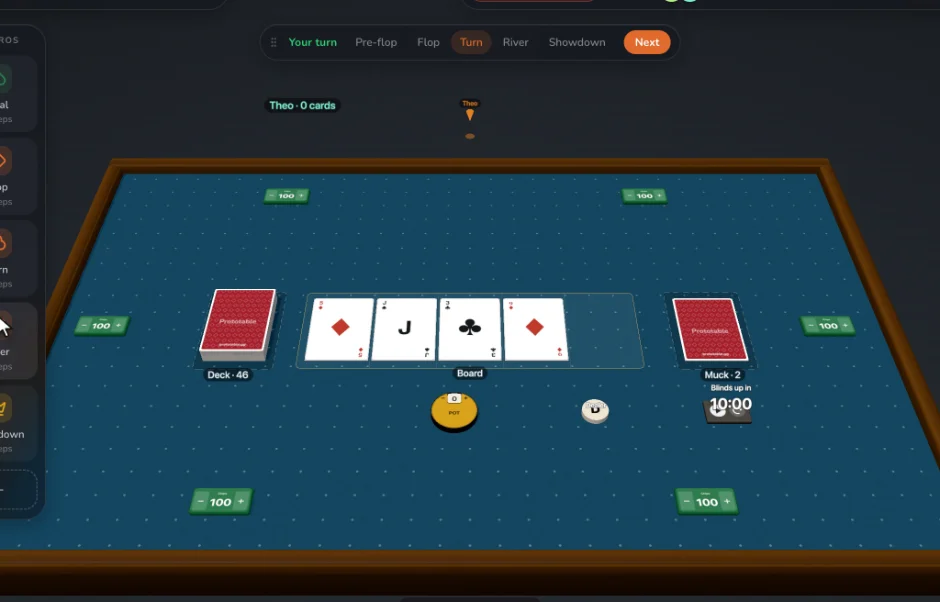
What your players see
A shared 3D table with your decks, a private hand that others see only as a count, and a seat around the table. It runs on a laptop, desktop, iPad or phone. A link can be open to anyone, need a PIN, or wait for your approval.
What you get as the designer
- Live edits: change a card and every copy updates during the game.
- Recording: sessions, the log, and start and end states you can restore.
- Notes and feedback: notes on cards, and a feedback form for players.
- Stand-ins: play every seat yourself before you invite anyone.
Run a better session
Set the table up before anyone arrives and save it as a layout. Talk on whatever call your group already uses. Watch what people do, note the moment someone hesitates, and ask about it afterwards: what was fun, what dragged, what would you change.
How many can play
2 players on the free plan, 12 on Designer. The limit comes from the plan of whoever owns the table, so your players never need a plan.
Step by step
- Get your cards in. Make them from a template, or bring in a spreadsheet or CSV, a folder of card images, PDFs made for print, or a Tabletop Simulator card sheet.
- Put a deck on the table. Make a deck, then deal it to the table.
- Choose who can join. In Host, pick Open, PIN or Approval, and copy the invite link.
- Press Record. Everything from here is kept for Review.
- Change what isn’t working. Edit a card mid-game. Everyone sees the new version at once.
Questions
Do playtesters need an account?
No. They join from a link in their browser, free, with nothing to install. Only the designer needs an account, and only to keep their work.
Can I test a multiplayer game alone?
Yes. Add stand-ins and play every seat, switching between them.
Are hands private?
Other players see only how many cards you hold. Every browser does hold the table’s data, so this is a table for friendly tests, not for money games.
Is there voice chat?
Not at the table. Use whatever call your group already uses, or the text chat at the table.
Related: What is playtesting? · How to playtest a card game online · The best card game playtesting software · vs Screentop · all tools.