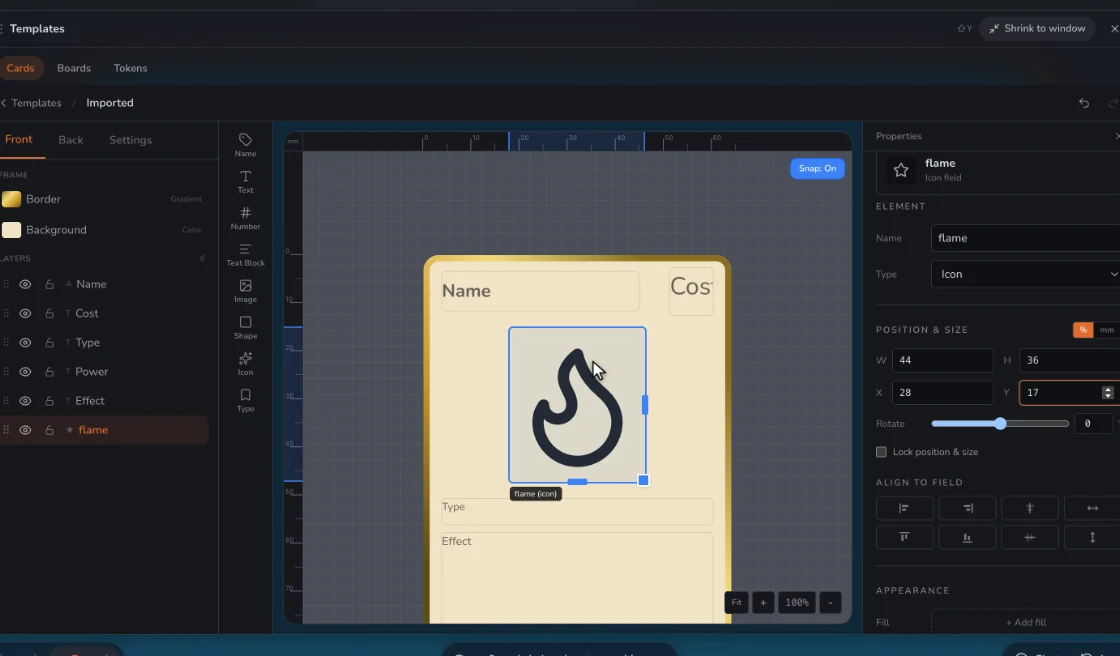
One layout, as many cards as you like
Design the card once: where the picture goes, the name, the stats, the back. Then each new card is just a row of details. Change the frame later and every card follows.
| Field | What it’s for |
|---|---|
| Name | Who or what it is |
| Picture | A photo or drawing, cropped in the app |
| Type Line | Team, position, class, element |
| Stats | Your own columns: Speed, Height, Goals |
| Flavor Text | A quote or a fun fact |
| Number | Card 12 of 40, for a collectible feel |
Make it look like yours
Your own fields, fonts, colors, border and card back, and any size, from the standard 2.5 × 3.5 inches that fits sleeves and binders to tall tarot or square.
Print them, or play them
Print lays cards out with cut guides as a PDF for home or a print shop. Or skip paper: put them on a table and send a link. Playing with them is free for whoever you invite.
Mind whose art it is
Fine for your own art and your own photos. If you make cards of characters someone else owns, keep them private: don’t publish or sell them.
Step by step
- Pick a size. Poker size fits standard sleeves and binders.
- Lay out one card. Add a picture field, a name and whatever stats you want.
- Fill in the rest. In Data, one row per card, or import a spreadsheet.
- Print or share. Print a PDF, or put them on a table and send the link.
Questions
Can I make trading cards for free?
Yes. Free covers two games and prints with a small watermark. Designer prints clean.
What size are trading cards?
Usually 2.5 × 3.5 inches, the same as poker cards, and what most sleeves are made for.
Do I need design skills?
No. Start with text and a picture on the starter template, and change it when you want.
Related: Trading card template · Blank trading card template · Making a whole game? TCG maker · Poker card size · all tools.